
What is a Digital Service History?
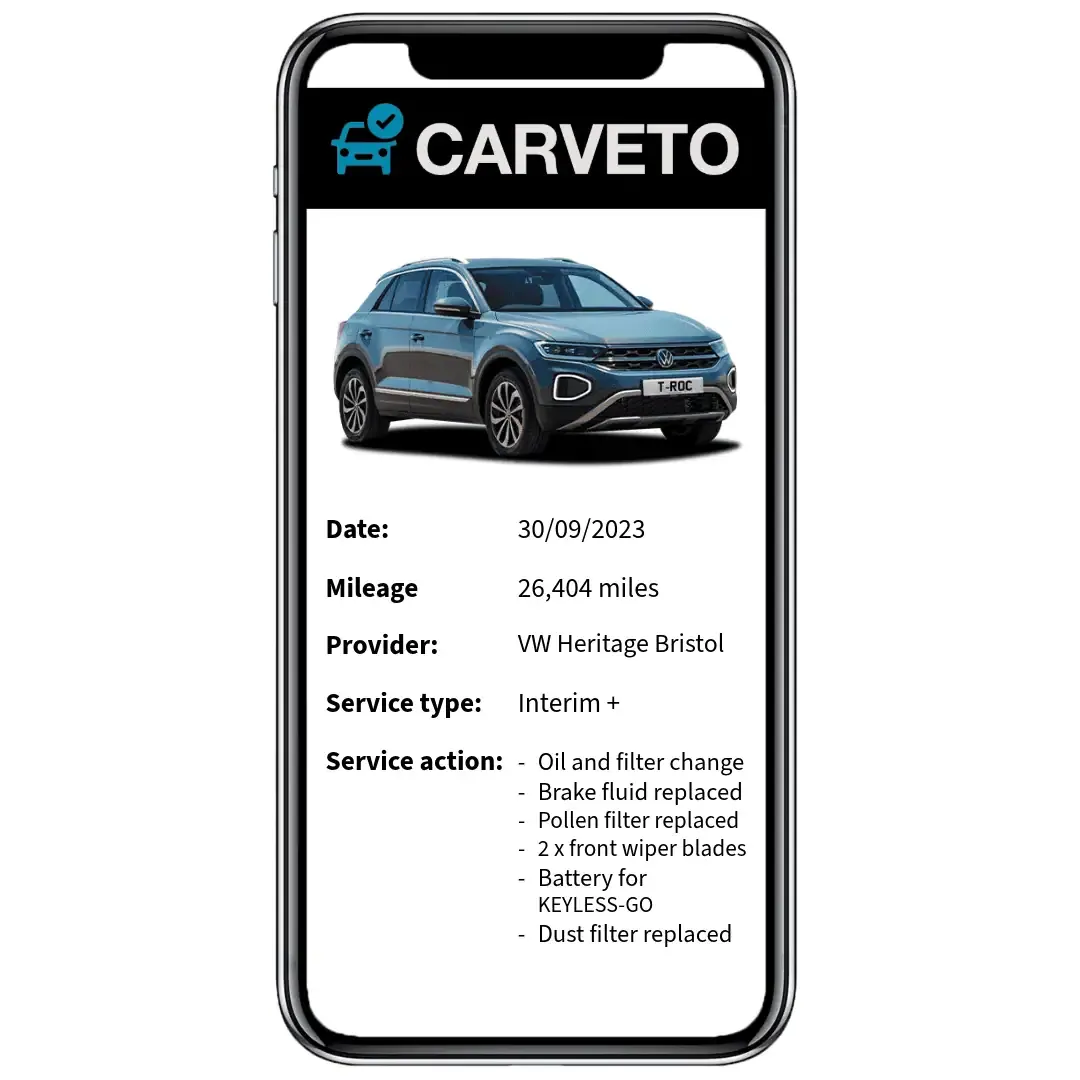
A Digital Service History (DSH) is a tamper-proof record of a vehicle’s maintenance events, digitally stored by the manufacturer and linked to the car’s Vehicle Identification Number (VIN).
Unlike paper service booklets, a DSH cannot be lost, edited, or falsified.
All entries are submitted by authorised dealerships and securely recorded in the manufacturer’s database.
These entries include routine servicing, repairs, diagnostics, parts replacements, warranty work, software updates, and only completed recall repairs.
Unresolved recalls do not appear in the DSH and require separate lookup tools.
The digital format ensures unmatched transparency, protecting both buyers and sellers by proving that essential maintenance has been completed.
Because it is centralised and secure, a DSH supports warranty validation, resale value, and buyer confidence.
Third-party services can retrieve official DSH records by scanning manufacturer systems across supported vehicle brands.
This service helps verify service history and identify missing or suspicious entries.
A Digital Service History typically logs:
- Scheduled service intervals and oil changes
- Mechanical or electrical repairs
- Diagnostic test results
- Software or ECU updates
- Warranty-covered replacements
- Completed recall repairs
Find Your Cars Digital Records
Submit your VIN and vehicle details to check if a Digital Service History (DSH) exists for your car.
We manually search manufacturer databases to retrieve official service records that show verified maintenance entries, completed recalls, and dealership uploads.
CarVeto supports DSH lookups for 31 brands from 2012 onwards, including Audi, BMW, Mercedes-Benz, VW, Ford, Vauxhall, Toyota, and more.
Record details vary by manufacturer and depend on authorised dealer uploads.
✅ What you’ll need:
- Full name and contact info
- Vehicle registration and full VIN
- (Optional) Notes about missing history
💷 Free if no records found — fee only applies if DSH is available.
CarVeto has checked 5.4M+ UK vehicles and holds a 4.9⭐ Trustpilot rating.
- How Digital Service History Works
- What Gets Logged in a Digital Service History?
- Manufacturer Recalls in Digital Service History
- Digital vs Paper Service History
- Why Digital Service History Matters When Buying a Used Car
- How to Check a Car’s Digital Service History
- Can a Digital Service History Be Faked?
- What If a Car Has Gaps in Its Digital Service History?
- How Digital Service History Affects Resale Value
- CarVeto and Digital Service History Checks
- FAQs About Digital Service Records
How Digital Service History Works
A digital service history is a timestamped, dealer-uploaded system that records each maintenance event in the manufacturer’s central database.
Authorised dealerships upload service data into the manufacturer’s system, where it becomes permanently linked to the vehicle’s VIN and safeguarded from edits.
This ensures a consistent, unalterable timeline of maintenance events, supporting provenance checks and buyer trust.
Buyers can access a vehicle’s DSH via a manufacturer portal, a dealership request, or an independent vehicle history service.
Only completed recalls appear.
Entries are added once digitally confirmed by an authorised repairer.
🔧 How the process works:
- Dealership completes service, repair, or diagnostic work
- Maintenance details are submitted into the manufacturer database
- The event is timestamped and linked to the vehicle’s VIN
- The entry is encrypted and sealed for integrity
- Buyers retrieve records through dealerships, brand portals, or CarVeto
- Recall actions appear only after dealer-confirmed completion
This system provides secure, transparent maintenance tracking, essential for buyers assessing service consistency and recall compliance.
What Gets Logged in a Digital Service History?
A digital service history (DSH) captures a comprehensive and timestamped log of all verified maintenance actions, uploaded by authorised dealerships and bound to the vehicle’s VIN.
These entries create a tamper-resistant trail of how the car has been maintained, repaired, and updated over time.
Below is a structured breakdown of what typically gets recorded in a manufacturer-backed DSH:
🛠️ Routine Maintenance
Standard service actions that ensure ongoing performance and reliability:
- Scheduled servicing and oil changes
- Fluid top-ups and brake/clutch bleeding
- Filter replacements (air, fuel, oil, pollen)
- Mileage-based inspection intervals
🔧 Repairs & Warranty Work
Corrective actions and manufacturer-covered fixes:
- Mechanical repairs (brakes, suspension, engine, drivetrain)
- Electrical system repairs (batteries, sensors, wiring, alternators)
- Replacement of worn parts (timing belts, bulbs, tyres)
- Warranty repairs or part replacements under manufacturer cover
💻 Software & Electronics
Digital updates and diagnostics for modern vehicles:
- ECU (Engine Control Unit) firmware updates
- Software patches for infotainment, sensors, or performance
- Telematics or emissions system recalibrations
- Diagnostic trouble code (DTC) scans and health reports
⚠️ Safety & Compliance
Critical for roadworthiness, insurance, and resale:
- Completed manufacturer recall repairs
- Emissions compliance checks (where applicable)
- Safety inspections tied to specific service intervals
- Airbag, ABS, and stability control system updates
Each entry strengthens the vehicle’s maintenance provenance and helps buyers verify proper care, compliance, and software relevance, especially for high-tech or emissions-sensitive models.
Only completed recall repairs are shown in the DSH.
Unresolved recalls require a separate lookup using manufacturer systems or independent recall alert tools.
Note: Not all servicing may appear in a DSH.
Independent garages that lack authorised upload access cannot submit entries to the manufacturer system.
As a result, even well-maintained vehicles may show service history gaps despite routine maintenance.
Manufacturer Recalls in Digital Service History
Digital service histories log outstanding recalls once repaired by an authorised dealer, and appear in the system.
This distinction is critical for safety. Unresolved recalls may affect roadworthiness and carry legal or insurance risks.
Buyers relying only on the DSH could miss these issues unless they perform a separate check.
CarVeto helps bridge this gap by scanning official manufacturer databases to flag open recalls during a vehicle history check, offering a full view of a vehicle's safety status.
✅ Key Points:
- Completed recalls are logged in the digital service history
- Outstanding recalls are not shown in the DSH
- Buyers should check recall status separately via tools like CarVeto
- Confirmed recalls strengthen the vehicle’s maintenance record
Digital vs Paper Service History
A digital service history is a manufacturer-controlled record that offers greater security, authenticity, and completeness than traditional paper service booklets.
Paper records rely on manual entries and dealer stamps. T
These can be misplaced, handwritten poorly, or even forged.
Pages go missing, services go unstamped, and there’s no central verification system.
Digital records are managed through central manufacturer systems and can only be updated by authorised service providers.
Each entry is linked to a VIN Check and stored in the manufacturer’s central system, preventing tampering or loss.
Digital history builds trust among used-car buyers by providing verifiable evidence of maintenance, warranty work, and completed recalls.
Buyers can access DSH records via dealerships, manufacturer portals, or third-party platforms like CarVeto, which also checks mileage patterns, MOT history, and recall status.
When comparing the two formats, digital service history consistently offers stronger data integrity, long-term accessibility, and buyer assurance.
Comparison Table: Digital vs Paper Service History
Feature | Digital Service History | Paper Service Booklet |
|---|---|---|
Authenticity | Timestamped, encrypted, and dealer-uploaded | Handwritten, stamp-based, prone to forgery |
Tamper Resistance | Cannot be edited or overwritten | Susceptible to manual alterations |
Accessibility | Available via dealer, manufacturer, or CarVeto | Requires physical document — may be lost |
Completeness | Centralised log of authorised service events | May contain gaps or missing pages |
Recall Logging | Completed recalls added automatically by the dealer | Often absent or manually scribbled |
Buyer Confidence | High — official, verified data source | Lower — requires extra checks for authenticity |
Learn more about a pre-digital Car Service History Check.
Why Digital Service History Matters When Buying a Used Car
A complete digital service history (DSH) provides verified proof that a used vehicle has been properly maintained.
It helps buyers assess risk, confirm reliability, and make safer purchasing decisions.
Each DSH record is submitted by an authorised dealership and permanently tied to the vehicle’s VIN in the manufacturer’s database.
This makes the service log tamper-proof, timestamped, and immune to forgery.
It allows buyers to verify maintenance intervals, check recall compliance, and validate mileage patterns, all of which influence warranty eligibility and resale value.
In contrast, a missing or incomplete service history leaves critical gaps.
Without digital confirmation, buyers face uncertainty around past maintenance, hidden faults, or outstanding safety recalls.
Even if a vehicle looks well-kept, the absence of a DSH reduces trust and increases risk.
Some vehicle history services retrieve official DSH records across dozens of brands, helping buyers verify gaps, mileage consistency, and recall compliance.
It checks flag missing history, irregular mileage, and open recalls, providing a clearer picture of the vehicle’s background.
✅ Why DSH matters for used car buyers:
- Confirms servicing was completed at the correct intervals
- Verifies dealer-completed recall repairs
- Supports valid manufacturer warranty claims
- Tracks mileage history for irregularities
- Increases buyer trust in mechanical care
- Minimises risk of hidden maintenance gaps
How to Check a Car’s Digital Service History
Digital service history (DSH) records are stored in secure manufacturer databases and can be accessed through a range of official and third-party channels.
The log typically includes service dates, mileage readings, technician input, and confirmation of any recall work performed.
These records help verify how the car has been maintained and whether essential work, such as safety recalls or software updates, has been completed.
To check a car’s DSH, use the following access points:
- Manufacturer portals: Brands like BMW, Mercedes, VW, Ford, and Audi offer online portals where VIN-linked service histories can be viewed (access may require account login or proof of ownership).
- Authorised dealership: Buyers can request a printed or emailed service summary from a main dealer in the car’s brand network.
- Previous owner: The seller may hold a digital or printed DSH export, available via email or USB during a sale.
- Independent vehicle checks: Scan manufacturer databases to retrieve digital service records and flag missing entries.
Important Notes:
- Outstanding recalls are not shown in the DSH. A separate recall check is always advised.
- Data privacy laws may limit access.
- Some manufacturers require proof of ownership or a dealership request to release full service history.
- Not all brands offer public DSH access or allow third-party retrieval.
Can a Digital Service History Be Faked?
A genuine digital service history (DSH) is extremely difficult to fake because it can only be updated by authorised dealerships, using VIN-linked uploads into manufacturer-controlled databases.
Each entry is digitally sealed and permanently archived, making it tamper-resistant and inaccessible to unauthorised parties.
Owners, sellers, and independent garages cannot alter or insert records.
However, fake screenshots or PDFs that mimic real DSH layouts can still circulate, especially during private sales.
Buyers should treat any DSH evidence cautiously unless it’s sourced directly from a manufacturer portal, dealership system, or third-party validator.
CarVeto helps detect anomalies by scanning for gaps in servicing, inconsistent mileage logs, and unusual timeframes between events, all of which may signal manipulated data or missing history.
Cross-referencing DSH with MOT records and recall checks provides an extra layer of fraud protection.
What If a Car Has Gaps in Its Digital Service History?
Gaps in a digital service history (DSH) can occur for several reasons, and they don’t always indicate serious problems.
Some independent garages don’t have access to manufacturer upload systems, so routine services may go unrecorded.
In other cases, delays in data entry, skipped maintenance, or owner neglect can leave visible breaks in the service log.
Even if a DSH contains gaps, completed recall repairs will still appear, as authorised dealers must upload these.
However, missing services between key mileage intervals may reduce warranty validity, resale value, and buyer confidence.
Buyers should cross-reference the digital record with other data sources to build a fuller picture.
Checking the car’s MOT history, mileage patterns via BVRLA and RMI, and recall status helps reveal whether gaps are due to missing uploads or signs of poor maintenance.
CarVeto’s history checks help detect these patterns, flagging service gaps, mileage inconsistencies, and unresolved recalls so buyers can make informed, low-risk decisions.
How Digital Service History Affects Resale Value
A complete digital service history (DSH) can significantly boost a vehicle’s resale value by demonstrating consistent care, recall compliance, and verified mileage.
Buyers are more likely to trust and pay more for a used car with a fully documented digital history.
It shows that the vehicle was serviced at the proper intervals, any warranty work was completed, and authorised dealerships handled critical repairs or recalls.
This strengthens perceived reliability and speeds up the sales process.
In contrast, missing DSH entries or outstanding recalls introduce risk.
They raise questions about how the car was maintained and may reduce warranty eligibility.
Vehicles without a full service trail tend to attract lower offers and sit on the market longer.
CarVeto helps sellers present a complete, verifiable maintenance profile by retrieving DSH data and flagging gaps or unresolved issues.
This uses a manual VIN search separate from our premium Vehicle Details Check.
This makes it easier to justify a higher asking price and close the sale with confidence.
CarVeto and Digital Service History Checks
CarVeto helps used car buyers access and interpret digital service history (DSH) records while providing broader vehicle background data beyond manufacturer systems.
During a CarVeto check, service entries are retrieved directly from manufacturer databases and cross-referenced with MOT history, mileage logs, and recall status.
This helps detect inconsistencies, skipped maintenance, or gaps that could affect warranty coverage or resale value.
In addition to DSH verification, CarVeto provides complete vehicle provenance checks, drawing on trusted sources such as the BVRLA, RMI mileage registers, and manufacturer recall registries.
Learn more about How to Verify Mileage on a Used Car.
✅ CarVeto’s history check includes:
- Verified digital service records (where available)
- Open and completed recall status
- MOT and mileage cross-checking
- Finance, write-off, and stolen vehicle status
- Source validation from BVRLA, RMI, and OEM systems
This provides buyers with a broader, more reliable view of a used car’s condition and background.
Note: While CarVeto retrieves DSH records for over 30 brands, data availability may vary by manufacturer, vehicle age, and database availability.
Records from unauthorised or independent garages are not included in manufacturer-linked DSH systems.

FAQs About Digital Service Records
Only completed recalls appear in the DSH.
Outstanding recalls are not shown and must be checked separately via manufacturer systems or tools like CarVeto.
You can view a DSH through a manufacturer portal (e.g., BMW, VW, Mercedes), request it from an authorised dealership, or use a third-party service like CarVeto.
Some systems require a VIN and Proof of Car Ownership.
Yes. Most manufacturers have phased out paper booklets in favour of secure, VIN-linked digital records.
There may be a gap in the DSH.
Buyers should cross-check with MOT history and mileage records to identify missing entries.
No. Only authorised dealers or approved workshops with manufacturer access can upload service entries.
Over 30 brands support DSH, including BMW, Audi, VW, Mercedes, Ford, Vauxhall, Renault, Citroën, and others.
No. MOT records are managed separately by DVSA.
CarVeto combines MOT and DSH data in its reports for clarity.